
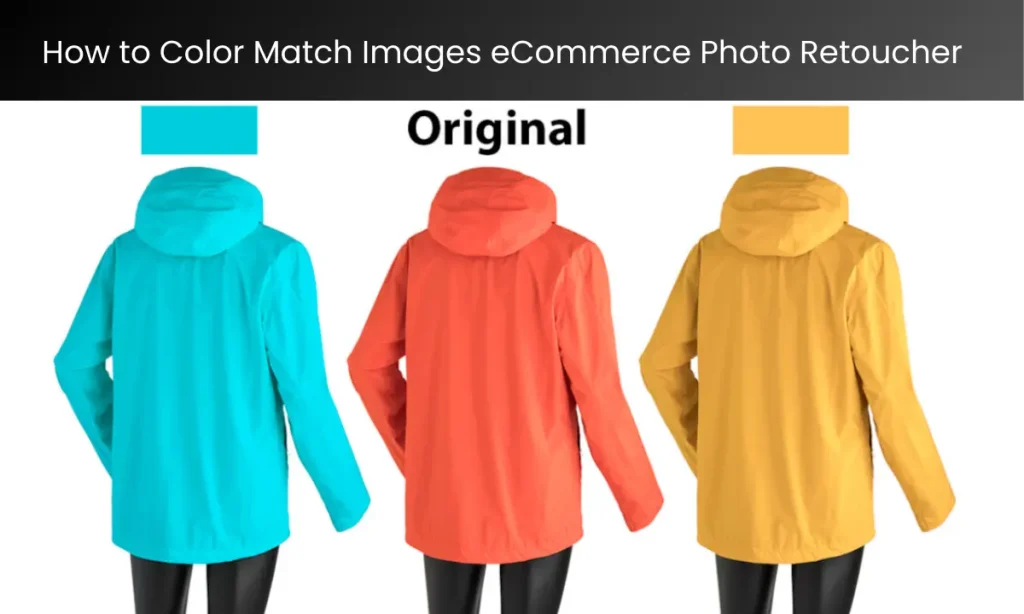
How to Color Match Images: A Guide for Ecommerce Photo Retouching
When you shop online, have you ever noticed how the products look perfect? The colors are bright, matching exactly what you expect. This magic doesn’t just happen on its own. Behind every image, there is a skilled photo editor who makes sure everything looks just right. How to Color Match Images eCommerce Photo Retoucher . One of the most important parts of this job is called color matching. In this article, we’ll explain what color matching is, why it’s so important, and how ecommerce photo retouching like those at Photo Editing Everyday make it happen.
What is Color Matching?
Color matching is the process of making sure that the colors in a product photo look the same as the actual product. For example, if you’re selling a red T-shirt, you want it to look just as red in the photo as it does in real life. This is especially important for online stores because customers can’t touch or try on the product before buying. The photo has to tell the truth!
Why is Color Matching Important?
Here are some reasons why color matching matters so much:
- Customer Trust: Imagine buying a blue jacket online, but when it arrives, it looks green. You’d feel disappointed, right? Accurate colors help customers trust your brand.
- Fewer Returns: When the colors match perfectly, customers are less likely to return items. This saves time and money for the store.
- Professional Look: Perfectly matched colors make your online store look neat and professional. This can attract more customers.
- Consistent Branding: Some stores have specific brand colors. For example, a logo might always be a particular shade of yellow. Color matching ensures these colors stay consistent across all images.
Tools for Color Matching
Ecommerce photo retouching use special tools to help them match colors perfectly. Here are some of the most popular ones:
- Adobe Photoshop: This is one of the best tools for editing photos. It has features like color balance, hue/saturation, and curves that help adjust colors.
- Colorimeters: These are devices that measure the exact colors on a screen. They make sure the colors you see on your computer match real life.
- Lightroom: Another powerful tool, Lightroom, is excellent for batch editing multiple images at once, ensuring all product photos have consistent colors.
Steps to Color Match an Image
Let’s break it down step by step so even beginners can understand how color matching works:
1. Start with Good Lighting
The first step to great color matching starts before you even take the photo. Make sure the lighting is even and natural. If possible, use daylight or professional studio lights. Avoid shadows because they can make colors look different.
2. Calibrate Your Monitor
Before you start editing, make sure your computer screen shows colors accurately. You can use a colorimeter for this. Calibration ensures that the colors you see on your screen are true to life.
3. Open the Image in Editing Software
Once the photo is ready, open it in a tool like Adobe Photoshop or Lightroom. Zoom in to check the details.
4. Adjust White Balance
White balance is the first thing to fix. If the image looks too yellow or too blue, adjust the white balance to make it neutral. This ensures that other colors will look natural too.
5. Use Color Samples
If you have the product in front of you, compare its color with the photo. Use the color picker tool in your software to match the hues closely.
6. Correct Hue, Saturation, and Brightness
- Hue: Adjust this to match the exact shade of the product.
- Saturation: Increase or decrease to make the color pop or look more natural.
- Brightness: Make sure the color isn’t too dark or too light.
7. Check Against Reference Images
If the client has provided reference images or a color swatch, use these to ensure accuracy.
8. Apply Color Grading (If Needed)
Sometimes, editors add color grading to give the image a consistent look. For example, a warm tone can make the image feel cozy, while a cool tone might look modern.
9. Save and Export
Once everything looks perfect, save the image in the right format (like JPEG or PNG). Make sure it’s optimized for web use so it loads quickly on ecommerce sites.
Challenges in Color Matching
Even though color matching is important, it’s not always easy. Here are some common challenges:
- Different Screens, Different Colors: Colors can look different on various devices. A photo might look perfect on your computer but appear dull on a phone.
- Complex Patterns: Matching colors in products with multiple colors or patterns can be tricky.
- Lighting Differences: Sometimes, the lighting in the original photo doesn’t match the product’s real-life look.
- Time Constraints: Ecommerce stores often need edits done quickly, which can make detailed work like color matching challenging.
How Photo Editing Everyday Does It Right
At Photo Editing Everyday, we use advanced tools and techniques to overcome these challenges. Our team of experts understands how important it is for product photos to look perfect. Here’s what makes us stand out:
- Experience: We’ve worked with many big and small ecommerce brands, so we know how to meet high standards.
- Attention to Detail: We take the time to ensure every photo is flawless.
- Fast Turnaround: Even with tight deadlines, we deliver top-quality edits.
Fun Activities to Understand Color Matching
If you’re 9 to 11 years old and want to understand color matching better, here are some fun things to try:
- Color Hunt: Look around your house for objects in the same color family (like different shades of green). Try to match their colors in a drawing.
- Photo Editing Apps: Use apps like Snapseed or Canva to play with colors in your photos.
- Create a Color Wheel: Draw your own color wheel and learn how colors mix together.
Conclusion | How to Color Match Images eCommerce Photo Retoucher
Color matching might seem like a small detail, but it makes a big difference in ecommerce. It builds trust, reduces returns, and makes online shopping a delightful experience. With practice and the right tools, anyone can learn this skill. Whether you’re a professional retoucher or just starting out, remember that attention to detail is the key to success.
At Photo Editing Everyday, we’re proud to help businesses bring their products to life through perfect color matching. If you’re ever curious or need help, we’re just a click away!